Fingerprint vs Face Recognition Attendance Machines: How to Choose
August 25, 2026
Most organisations reach a point where RFID card punching is no longer feasible. Cards get shared or lost, and the payroll team spends the last week of every month reconciling numbers nobody fully trusts. Biometric attendance machines solve that by tying the punch to the person rather than to a credential someone can hand over at the gate.
The question then becomes which biometric. For the overwhelming majority of workplaces the shortlist comes down to two: fingerprint attendance machines and face recognition attendance machines. Both are mature technologies, both are affordable at scale, and both will do the job in the right environment.
They fail in completely different ways, though, and the failure mode matters far more than the specification sheet. This guide explains how each one actually captures and matches a person, sets out the real performance figures side by side, and gives you a checklist to work through before you shortlist a supplier.
How a fingerprint attendance machine works
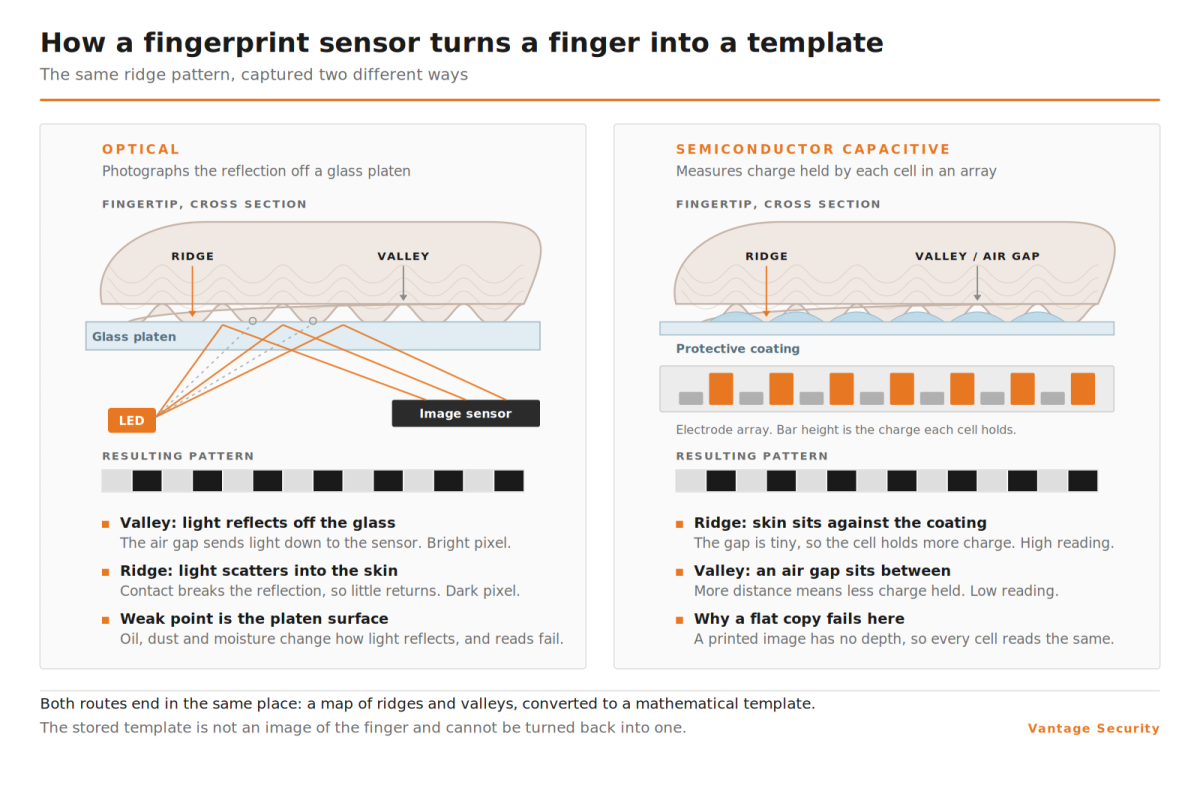
A fingerprint attendance machine does not store a picture of your finger. It captures an image of the ridge pattern, extracts the distinctive points where ridges end or split (these are called minutiae), and converts those points into a mathematical template. On the next punch it repeats the capture, extracts the points again, and compares the two. If enough points align within tolerance, it registers a match and writes the punch.
That distinction matters when the question of privacy comes up in a tender or project.
Two sensor types are in common use, and Vantage terminals use both depending on the model.
Optical sensors
An optical sensor shines light onto the finger and photographs the reflection. It is the more widely deployed option, it copes with a broad range of finger sizes, and it is physically robust. Vantage optical terminals use a scratch proof optical sensor with 600 dpi resolution and a 360 degree verification angle, which means the user does not have to present the finger in a particular orientation. Its weakness is the platen, the glass surface the finger touches. Oil, dust and moisture accumulate on it, and a dirty platen produces failed reads that staff experience as the machine not working.
Semiconductor capacitive sensors
A capacitive sensor measures the small differences in electrical charge between the ridges and the valleys of the fingerprint. It produces a cleaner template, it is less sensitive to surface contamination, and it is harder to fool with a flat reproduction because a printed image has no differential capacitance. On the Vantage range, capacitive sensing appears on the multi-modal AI terminals rather than the entry level units, which is worth knowing if sensor type is a requirement rather than a preference.
A note on terminology. Fingerprint attendance system and fingerprint attendance machine get used interchangeably, but in practice the machine is the terminal on the wall and the system is the terminal plus the software that collects punches and turns them into timesheets. You need both, and the software side is where most implementations either succeed or quietly fall apart.
Where fingerprint genuinely struggles
- Worn ridges. Manual trades, chemical handling, repeated abrasion and simple ageing all flatten the ridge pattern. A proportion of any workforce will never enrol cleanly. Published failure to enrol rates vary enormously depending on the population tested, so treat headline figures with caution and run a pilot enrolment with your own staff before you commit.
- Wet, dusty or greasy hands. Common on production floors, in kitchens and on construction sites.
- Gloves. Non-negotiable in food processing, healthcare, cold storage and much of the chemical industry. The glove has to come off, every punch, for every shift.
- Throughput. One person at a time, physically making contact with a surface, at around one second per verification. At a gate handling several hundred people inside a fifteen minute shift change, this becomes the constraint.
How a face recognition attendance machine works
A face recognition attendance machine captures an image, locates the face within it, and maps the geometric relationships between landmarks: the distance between the eyes, the bridge of the nose, the contour of the jaw, the position of the brow. Those relationships become the template. As with fingerprint, what gets stored is a set of numbers rather than a photograph, although many terminals also retain a snapshot of each punch for audit purposes, and that snapshot is a photograph. If your organisation has a position on image retention, this is the setting to ask about.
Capture hardware is the single most important thing to establish when you compare fingerprint and face readers, because the term face recognition covers quite different levels of capability.
Single camera capture
One visible light camera. The cheapest option, and acceptable in stable indoor lighting. It degrades in backlight, in direct sun and in darkness. A single camera terminal without additional liveness checks can in principle be presented with a photograph on a phone screen.
Dual camera capture with infrared
A visible light camera paired with an infrared one. This is what the Vantage face terminals use, typically a Full HD colour camera alongside a Full HD infrared camera. Pairing the two does three things at once. It allows recognition in darkness, because the infrared camera does not depend on ambient light. It provides anti-spoofing, because a printed or displayed photograph does not return the same infrared signature as living skin. And combined with wide dynamic range processing it holds up in strong backlight, which is the condition that defeats most single camera units.
Some models add automatic fill light, where a white LED lights up only when a face is captured in low light, and dark ambience control that switches between white and infrared illumination according to conditions. On the wider models the usable ambient light range runs up to 50,000 lux, which covers everything from a dark loading bay to full daylight.
There is also structured light or 3D capture, which projects a pattern onto the face and reads how it distorts to build actual depth. It is the most resistant to presentation attacks and it costs the most. For a standard commercial entrance the dual camera infrared approach is generally sufficient, and it is the specification you should be asking about by name rather than accepting face recognition as an answer.
Where face recognition struggles
- Single camera terminals in strong backlight. A staff entrance with a glass wall behind the queue is a genuine problem for units without infrared and wide dynamic range.
- Significant appearance change. Full face coverings, welding masks and some safety goggles will defeat most terminals. Hard hats and standard safety glasses generally will not, and mask detection is supported across most of the range.
- Very large databases. Both matching time and false accept rate climb as the enrolled population grows. This is the reason to check the terminal’s stated user capacity against your actual headcount plus growth, not just your headcount today.
- Poor enrolment. A rushed or badly lit enrolment image produces a template that causes persistent problems for that individual. Budget proper time for enrolment day.
If you are weighing face specifically rather than comparing the two, there is a fuller treatment in our guide to face recognition attendance systems.
Fingerprint vs face recognition, side by side
The figures below are drawn from Vantage terminal specifications across both ranges. Where a range is shown, it reflects the spread between entry level and high capacity models.
| Criterion | Fingerprint terminals | Face recognition terminals |
| Capture method | Contact, finger placed on a sensor | Contactless, 0.5 to 2.5 metres from the terminal |
| Verification speed | Around 1.0 second | 0.1 to 0.2 seconds |
| Simultaneous users | One at a time | Up to 5 recognised at once on most models |
| Template capacity | 1,000 to 30,000 on dedicated terminals | 5,000 standard, 30,000 optional, up to 100,000 on AI models |
| Stated recognition accuracy | Not quoted as a percentage | 98.9% to 99.8% depending on model |
| Networking | TCP/IP on most, but some entry readers are offline only over RS485 | TCP/IP standard, Wi-Fi optional, offline or online mode |
| Performance with gloves | Fails. The glove must be removed. | Unaffected |
| Performance with wet, dusty or worn fingers | Degrades noticeably. Some users never enrol cleanly. | Not applicable |
| Performance in darkness | Unaffected | Unaffected on dual camera infrared models |
| Performance in strong backlight | Unaffected | Handled by wide dynamic range on dual camera models |
| Presentation orientation | 360 degree verification angle, any orientation | Face must be toward the terminal |
| Hygiene | Shared contact surface | No contact |
| Main spoofing risk | Lifted or moulded print. Mitigated by capacitive sensing. | Photo or video on a screen. Mitigated by dual camera infrared. |
| Typical relative cost | Lower | Moderate to Higher |
Two things in that table are worth pausing on.
Face wins decisively on speed and scale. At 0.1 to 0.2 seconds per recognition against roughly one second for fingerprint, and with the ability to recognise up to five people at once, a face terminal moves a queue around five times faster. Template capacity tells the same story: dedicated fingerprint terminals top out well below the AI face terminals, which reach 100,000. If your constraint is a shift change or a growing headcount, that is the whole argument.
What the table deliberately leaves out is a false acceptance and false rejection comparison, and it is worth explaining why. Every manufacturer in this category quotes FAR and FRR figures, and buyers routinely compare them across brands as though they were measured the same way. They are not. There is no shared test population, no shared threshold setting and no independent verification behind most published figures, so a tighter number on one datasheet does not reliably mean a better matcher. Treat FAR and FRR as an indication that the vendor has tested the device, not as a basis for choosing between two technologies. The environmental questions further down this page will tell you far more.
When a fingerprint attendance machine is still the right choice
Face recognition gets the marketing attention, but fingerprint remains the correct answer in a large number of deployments. It is the right call when most of the following apply:
- The workforce is office based, indoors and climate controlled.
- Headcount is modest, comfortably inside the low thousands.
- Hands are clean and ungloved during normal work.
- Lighting at the entrance is unpredictable and you would rather sidestep the question entirely, since fingerprint capture is indifferent to it.
- Presentation discipline is a concern. A 360 degree verification angle means the user cannot really present the finger wrongly, whereas a face has to be turned toward the terminal.
- Budget is the binding constraint and the alternative is no biometric system at all.
- There is an existing fingerprint enrolment you would otherwise have to redo from scratch.
- A shared contact surface is not a concern for the organisation or its sector.
In that profile a fingerprint terminal will deliver equal or better attendance integrity for less money, and the failure modes that trouble fingerprint elsewhere simply do not arise.
When face recognition wins
Face recognition earns its price premium wherever the hands are the problem or the queue is the problem:
- Construction, industrial and workshop environments, where hands are dusty, wet or damaged.
- Any gloved workforce. Food processing, healthcare, cold storage and chemical handling.
- High throughput entrances. Five times the verification speed and multi-user recognition removes the shift change bottleneck.
- Large or growing headcount, where fingerprint terminal capacity becomes a ceiling.
- Organisations with a contactless policy, whether that comes from infection control or from staff preference.
- Sites where a meaningful share of staff cannot enrol a usable fingerprint.
- Outdoor or semi-outdoor entrances, provided you specify dual camera infrared rather than single camera capture.
There is a regional dimension worth naming. Across much of the Gulf and wider Middle East, site entrances combine heat, fine airborne dust and long hours of very strong direct sunlight. Heat and dust are hard on optical fingerprint platens, and strong sun defeats single camera face capture. Dual camera terminals with wide dynamic range and an ambient light range running to 50,000 lux are specified precisely for those conditions, and models rated to IP65 or IP66 handle the dust. Shading the terminal still matters as much as choosing it.
You may not have to choose
The comparison above assumes a binary decision, and for a single site it usually is one. Across a multi-site organisation it often is not, and three options are worth knowing about.
Dual authentication terminals
Several Vantage terminals capture face and fingerprint in the same unit, and can be configured either as alternatives (staff use whichever works for them) or as a genuine two-factor requirement for high security areas. Capacities are held separately, so a dual authentication terminal might carry 5,000 face templates alongside 10,000 fingerprint templates. The alternatives mode solves the failure to enrol problem elegantly: the handful of staff whose fingerprints will not read simply use their face instead, and nobody has to be treated as an exception.
Palm vein recognition
Palm vein recognition reads the pattern of blood vessels beneath the skin rather than any surface feature. It is contactless, it is unaffected by surface dirt, ridge wear or lighting, and because the vein pattern is internal it is extremely difficult to spoof. It also sidesteps the privacy objection to facial images entirely, because no facial image is captured. Vantage palm vein terminals carry capacities from 10,000 up to 100,000 palm templates, usually alongside face and fingerprint on the same unit. It costs more than either fingerprint or face and it is not the default for a general office, but for high security areas or a workforce where fingerprint enrolment has genuinely failed, it belongs on the shortlist.
Handheld and mobile terminals
Where there is no fixed entrance to install against, a handheld face recognition terminal running on 4G or Wi-Fi records attendance at the point of work. This suits remote sites, roving supervisors and projects where the muster point moves week to week, and IP68 rated units survive being carried around a construction site.
Data storage and template security
This comes up in almost every serious tender, and the answer is more reassuring than most people expect.
Neither technology stores what you think it stores. A fingerprint terminal holds a minutiae template, a face terminal holds a set of geometric measurements. Neither can be reversed into the original image in any practical sense. On the storage architecture, Vantage terminals hold templates on the device itself, with a PC or server based application managing users, shifts and reports over the local network or by USB transfer. Most terminals run in either offline or online mode, and cloud connectivity and push data are supported but optional, which means the data can stay inside your own perimeter if that is what procurement requires. A few of the simplest access control readers are offline only and communicate over RS485 rather than TCP/IP, so if central management matters to you, check the communication interface on the specific model rather than assuming.
What you should still establish, in writing, before you buy:
- Whether the deployment will run offline, on your LAN, or with cloud sync enabled, and who signs that decision off.
- Whether punch snapshots are captured and retained. Many face terminals photograph each punch for audit purposes. That is a photograph, and it is subject to whatever image retention policy you operate.
- How templates are encrypted at rest and in transit between terminal and server.
- What happens on deletion. When someone leaves, is the template purged from every terminal, or does it linger on devices that were offline that day?
- Whether templates can be exported. If you switch supplier in five years, can you take enrolments with you or does everyone re-enrol?
A supplier who cannot answer these clearly is telling you something useful.
Integration with access control, turnstiles and payroll
An attendance terminal that only produces attendance data is doing half a job. Three integration points determine whether the system earns its keep.
Door and gate control
Most attendance terminals can also drive a lock or a barrier. On the Vantage AI terminals the access control interface typically provides a relay output, an alarm output, an exit button input, a door sensor input, an electromagnetic lock output and Wiegand 26/34 in and out on the same unit, which means the terminal can record the punch and release the door without a separate RFID access control controller. Anti-passback is available over Wiegand. Entry level terminals vary in what they expose, so confirm the interface list on the specific model rather than assuming it is uniform across the range.
Turnstiles and speed gates
Pairing an attendance terminal with a turnstile gate is what turns attendance data from a record into an enforcement mechanism. Nobody is inside the building without a punch, because the punch is what opened the lane. Most Vantage biometric terminals list a turnstile or flap barrier mounting bracket as an installation option alongside the standard wall mount and desktop stand, which makes this a specification choice rather than a fabrication job.
Payroll and HR software
The commonest cause of a failed rollout is not the hardware. It is the discovery, three months in, that the export format does not match what payroll needs and someone is manually reformatting a spreadsheet every month. Vantage terminals support shift schedule import and attendance report export both over the network and by USB through the time attendance software, but establish before purchase what formats the software produces, whether it handles your shift patterns, overtime rules and holiday calendar, and whether it can push data automatically rather than waiting for someone to run a report.
How to shortlist: a seven point checklist
- Count your gloves. If any meaningful part of the workforce wears gloves during normal work, fingerprint is out for that group before you compare anything else.
- Look at the entrance, not the brochure. Where does the terminal physically sit? Is there direct sun on it at any point in the day? Is it exposed to dust? A single camera face terminal facing a glass entrance wall will disappoint you, and an IP rating matters outdoors.
- Time your worst shift change. Count the people and the minutes. At roughly one second per fingerprint verification against 0.2 seconds for face, the arithmetic usually answers the question on its own.
- Take headcount plus five years of growth, then check that number against the terminal’s stated template capacity, not against your headcount today.
- Ask for the capture hardware in writing. Not face recognition, but single camera or dual camera with infrared. This is the specification that most affects real world reliability and it is the one most often left vague.
- Run a pilot enrolment. Take thirty staff from your most difficult group and enrol them. The percentage that fails is your real answer, and it will not match any published figure.
- Ask payroll what format they need before you sign anything, not after.
Work through those seven and the decision usually makes itself. If it still does not, that is generally a signal that a dual authentication terminal is the honest answer. For help narrowing the field, see our guide on how to shortlist a supplier.
Frequently asked questions
Is face recognition more accurate than fingerprint?
Not in a way you can settle from a datasheet. Face terminals quote recognition accuracy between roughly 98.9% and 99.8% depending on the model; fingerprint terminals tend not to quote a headline accuracy percentage at all, only false acceptance and false rejection figures. Those figures are not measured against a common standard across the industry, so comparing them brand to brand tells you very little. What does separate the two in practice is reliability in your specific environment. Fingerprint accuracy collapses with gloves, dust or worn ridges. Single camera face accuracy collapses in difficult lighting. Match the technology to the environment rather than to the number.
How much faster is face recognition than fingerprint?
Around five times. Vantage fingerprint terminals verify in approximately one second. Face terminals recognise in 0.1 to 0.2 seconds and can handle up to five people simultaneously. Over a shift change of several hundred people that difference is the difference between a queue and no queue.
Can a fingerprint attendance machine be fooled by a copy of a fingerprint?
An optical sensor with no liveness detection is more vulnerable to a high quality lifted print than most buyers assume. Semiconductor capacitive sensors are considerably harder to fool because a flat reproduction has no differential capacitance. If spoofing is a real concern for your site rather than a theoretical one, specify the sensor type rather than assuming.
How many users can a biometric time attendance system handle?
It varies widely by model. Dedicated fingerprint terminals typically hold 1,000 to 30,000 templates. Face terminals start at 5,000 with 30,000 as an option, and the AI models reach 50,000 or 100,000. Bear in mind that face matching slows and false accept rates rise as the enrolled database grows, so specify against headcount plus growth rather than headcount today.
Do fingerprint and face terminals work without an internet connection?
Yes. Most Vantage terminals run in offline or online mode, storing templates and punches locally and syncing to the server application over the LAN or by USB transfer when convenient. Cloud connectivity is supported but optional. Some entry level access control readers are offline only, which is fine for door control but means no central attendance reporting, so confirm the communication interface on the model you are quoting. For remote sites, also ask how many offline punches the terminal buffers before it starts overwriting.
Can we use both fingerprint and face on the same site?
Yes, in two ways. You can deploy different terminal types at different entrances, or you can use dual authentication terminals that capture both on one unit, with separate capacities for each. The second option is usually better where a small number of staff cannot enrol a usable fingerprint, because it avoids singling anyone out.
What happens to biometric data when an employee leaves?
The template should be deleted from the central database and from every terminal it was pushed to. This does not always happen automatically, particularly for terminals that were offline during the deletion. Ask your supplier to demonstrate the deletion workflow during evaluation, and check it again on a real leaver during the first month of operation.
Choosing the right system for your site
Fingerprint and face recognition are both good technologies that fail for different reasons. Fingerprint fails at the hands. Face fails at the light, unless you specify dual camera infrared capture, in which case it largely does not. Once you have looked honestly at your entrance, your workforce and your worst shift change, the answer is usually obvious, and where it is not, a dual authentication terminal removes the need to guess.
Vantage supplies fingerprint, face recognition, palm vein, dual authentication and handheld terminals across the full range, with matching time attendance software and access control integration. Browse the range, download the datasheets, or tell us about your site and we will specify against it.